Binlay Font: Elevating Web Design with Style
I was halfway through a redesign for a boutique lifestyle brand when I hit that familiar wall. The layout was clean, the color palette was sophisticated, but the hero section felt flat. It lacked personality. I needed a typeface that could bridge the gap between modern minimalism and human warmth without sacrificing readability on mobile devices. That's when I started testing Binlay.
As a web designer, I'm always cautious about introducing script fonts into digital interfaces. They can easily become illegible on small screens or slow down the visual scanning process if not handled correctly. However, Binlay immediately stood out. It is a distinct and stylish script font that manages to feel both ravishing and functional. From the moment I dropped it into the CSS stack for the main headline, the entire mood of the page shifted. It wasn't just text anymore; it was an experience.
Why Binlay Works for Digital Interfaces
The first thing you notice about Binlay is its flow. Unlike many decorative handwritten fonts that struggle with connectivity or awkward spacing, this premium font maintains a natural rhythm. For a UI designer, this is crucial. When a user lands on a product landing page or a course sales page, their eyes need to glide over the content effortlessly. Binlay facilitates this movement.
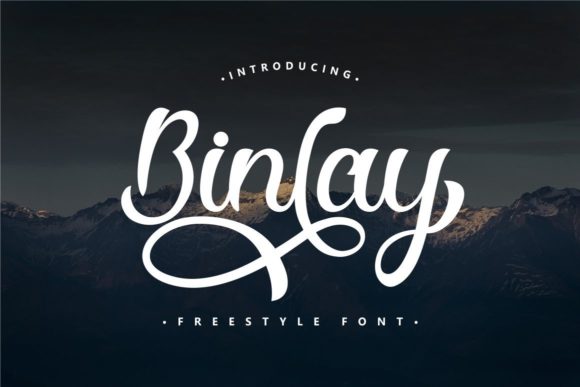
In my recent project, I used Binlay for the primary value proposition in the hero section. Placed over a high-quality image banner with a subtle dark overlay, the white lettering popped beautifully. The strokes are thick enough to remain clear even on a smartphone screen, yet delicate enough to retain an air of elegance. This balance is rare in the world of creative fonts. It proves that you don't have to choose between style and usability.
Another technical feature that makes Binlay a standout choice for professional projects is its encoding. The font is PUA encoded. For those who aren't deep into font files, this means you can access all glyphs and swashes with ease directly from your design software or word processor. In a real-world workflow, this saves hours. Instead of hunting through character maps or writing complex code to toggle alternates, I could quickly swap out standard letters for more decorative versions to create unique logos or accent pieces for the brand identity.
Strategic Placement in Web Layouts
Knowing where to use a script typeface is just as important as choosing the right one. I wouldn't recommend using Binlay for long paragraphs of body copy; that is a job for a clean sans serif font or a readable serif font. Instead, Binlay shines in specific, high-impact areas:
- Hero Headlines: Use it to grab attention immediately above the fold.
- Call-to-Action Buttons: Short phrases like "Join Now" or "Get Started" look inviting and personal.
- Section Dividers: Use swashes to create elegant breaks between content blocks.
- Testimonial Signatures: Add a human touch to client quotes.
- Logo Design: Perfect for boutique online stores or coaching websites needing a custom feel.
During the testing phase, I experimented with pairing Binlay with a geometric sans serif for the body text. The contrast was striking. The structured, neutral body copy allowed the ravishing style of Binlay to take center stage without competing for attention. This kind of font pairing creates a strong visual hierarchy, guiding the user's eye exactly where you want it to go. It tells the visitor what is important and what is supporting information.
Enhancing Brand Trust and Engagement
In the digital space, trust is often built through aesthetics. A polished, cohesive look suggests professionalism. When I swapped the generic system font for Binlay in the header of a coaching website mockup, the brand instantly felt more established. It conveyed a sense of care and attention to detail. Users subconsciously pick up on these cues. A well-chosen display font can make a new business feel like an industry leader.
However, readability remains king. Even with a beautiful script, if users can't read it, they will bounce. I tested Binlay across various breakpoints. On desktop, it looked magnificent at large sizes. On mobile, I had to ensure the line height was generous and that I wasn't trying to fit too many words on a single line. Script fonts need breathing room. By keeping the headlines short and punchy, I ensured that the modern typography remained legible on all devices.
I also checked how it performed against different backgrounds. While it excelled on image overlays, I found it equally effective on solid light backgrounds, provided the color contrast was high. For a blog redesign I was working on, I used Binlay for the post titles. It gave the editorial layout a magazine-like quality, elevating the perceived value of the content.
Practical Considerations for Designers
Before integrating any new asset into a client project, due diligence is required. With Binlay, it is essential to check the included styles and file formats to ensure they match your development environment. Whether you are building a static site or a dynamic web app, having the correct webfont files is non-negotiable for performance. Fast-loading visual content is critical for SEO and user retention.
Furthermore, always review the commercial font licensing. If you are creating a digital brand kit for a client who plans to sell products or run ads, you need to ensure the license covers commercial use. Binlay is designed for these exact scenarios, empowering creators to build gorgeous designs for online stores, campaign landing pages, and promotional materials without legal headaches.
The versatility of this script extends beyond the web. I've seen it work wonderfully in social media graphics and even packaging design mockups for digital products. Consistency across touchpoints strengthens brand recall. If a user sees the same distinctive typeface on your Instagram ad, your landing page, and your email newsletter, the connection becomes stronger.
Making the Final Decision
Choosing a font is rarely just about how it looks in isolation; it's about how it lives within your ecosystem. Binlay offers a unique blend of character and utility. It solves the common problem of script fonts feeling too casual or hard to read by offering a refined, robust structure. Its PUA encoding adds a layer of flexibility that streamlines the design process, allowing for quick iterations and custom touches.
If you are a SaaS founder looking to humanize your interface, a course creator wanting to add flair to your sales page, or a designer seeking that perfect accent for a portfolio homepage, Binlay is worth exploring. It invites users to fall for its style while maintaining the clarity needed for effective communication. In a crowded digital landscape, having a distinct voice matters. With the right typeface, you don't just fill space; you create an atmosphere that resonates with your audience.
Ultimately, the goal of web design is to connect. We use layout, color, and interaction to guide users toward a goal. Typography is the voice of that journey. By selecting a tool like Binlay, you are choosing a voice that is confident, stylish, and undeniably engaging. It transforms a standard layout into a memorable brand experience, proving that even in the age of AI and automation, the human touch of a well-crafted script still holds immense power.